Insight
One Brand from Digital to Physical
Customers should recognise the same organisation across a phone screen, proposal, vehicle, office and exhibition stand.
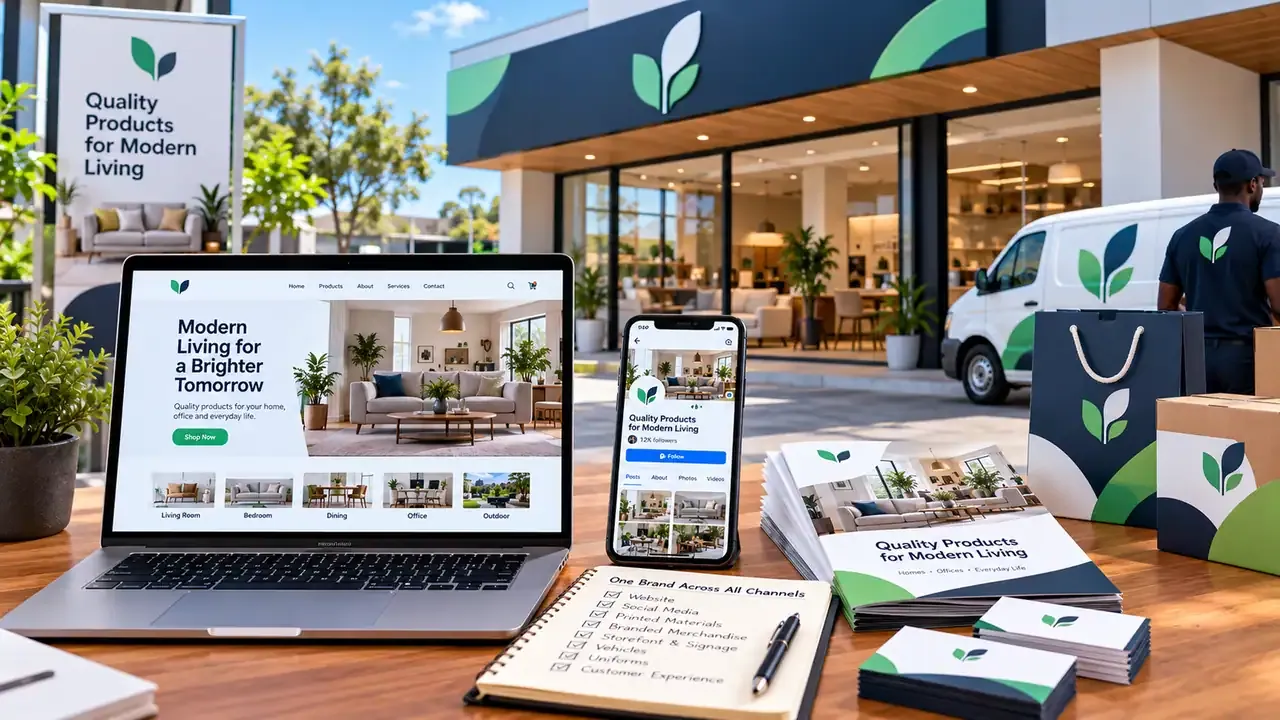
Customers should recognise the same organisation across a phone screen, proposal, vehicle, office and exhibition stand.
Consistency is operational, not just visual
Customers should be able to recognise your organisation wherever they encounter it: on a website, social media page, proposal, invoice, business card, office sign or company vehicle. When each item is designed separately, small differences accumulate. Logos change shape, colours drift, typefaces vary and contact details become inconsistent. A brand identity system gives the organisation a shared set of rules so every customer-facing touchpoint feels connected.
Start with a usable brand system
A complete identity is more than a logo file. It should define the logo variations, colour palette, typography, image style, tone of voice and practical rules for using these elements. Teams also need the correct file formats for different purposes: digital artwork, office documents, large-format print and production. Clear guidance helps staff and suppliers apply the brand without guessing.
Design for digital and physical environments
A logo that looks good on a desktop screen may need a simplified version for a small mobile header or social avatar. Outdoor signage has different requirements: viewing distance, lighting, material, installation surface and local site conditions all affect legibility. Vehicle graphics need to account for panel shapes and viewing angles. Printed brochures and stationery require attention to colour reproduction, margins and final artwork specifications.
These differences do not mean the brand should change from one medium to another. They mean the design system needs to anticipate the conditions in which it will be used. A useful rollout plan includes mock-ups and proofs before production, rather than discovering problems after materials have been printed or installed.
Protect consistency as the business grows
Give teams access to approved logos, templates and current contact details. Establish who can approve changes and how external suppliers receive artwork. When a phone number, address or service name changes, a simple checklist helps identify the website, email signatures, documents, signs and campaign materials that may also need updating.
For a new business, this process creates a professional foundation. For an established organisation, it can bring an inconsistent collection of materials back into alignment. It is also useful during a rebrand, office move, new product launch or expansion into another market.
What to include in a brand rollout checklist
- Approved logo files and clear-space rules.
- Colour and typography specifications.
- Website, social media and email signature templates.
- Business documents, stationery and presentation layouts.
- Signage, vehicle graphics and promotional materials.
- Artwork approval, production proofs and installation checks.
A practical brand audit across five touchpoints
Start with a customer journey rather than a pile of logos. Compare your Google Business Profile, website, social pages, invoice template and office or vehicle signage. Is the business name written the same way? Do colours, typography and contact details match? Can customers distinguish the primary logo from an old variation? A simple audit table showing each asset, its owner and the required correction makes the rollout easier to manage.
Prioritise assets that directly affect customer trust: quotes, payment instructions, website contact details and the pages prospects most often visit. Physical signage may need a survey, production proof and installation schedule. Digital assets may need updated image sizes and accessible text.
Keep the identity consistent as teams grow
Create a short brand guide with approved logo files, colour values, typefaces, usage examples and rules for spacing and backgrounds. Store editable master files separately from files intended for everyday staff use. Assign responsibility for approving new materials and replace old templates in planned batches. For a business operating in multiple locations, distinguish genuine branch details while retaining one central visual system. Review the results after rollout so that abandoned social covers, signatures and documents do not keep the old identity alive.
Frequently asked question: should everything be replaced at once?
Usually it is better to roll out the new identity in an agreed order. Start with public contact information and high-volume customer materials, then schedule lower-priority items around stock and maintenance cycles. Keep a record of which legacy assets remain and a deadline for replacing them. An overnight change may be appropriate for digital profiles, but physical stock and signage can require a managed transition.
Bring the brand together with FMG
FMG Business Solutions works across brand strategy and creative services, print production and signage and brand activation. We can help plan how the identity should work across digital and physical touchpoints, with the scope agreed around your organisation's requirements. Discuss your brand rollout with FMG.
Audit every customer touchpoint
Compare your website, proposals, invoices, social profiles, signage and vehicles. Note mismatched logos, old contact details and inconsistent typography.
Coordinate a controlled rollout
Keep approved identity files and templates in one accessible place, assign an owner and replace outdated assets in stages. Check every physical installation and digital update before marking it complete.
Implementation checks
- Define the business outcome and accountable owner.
- Test a realistic exception before launch.
- Confirm data access, permissions and change approval.
- Record support, training and ongoing costs.
Key takeaways
- Create a brand system rather than isolated artwork.
- Design for both digital and physical contexts.
- Use production rules that protect consistency as the brand scales.
Published 8 September 2026